
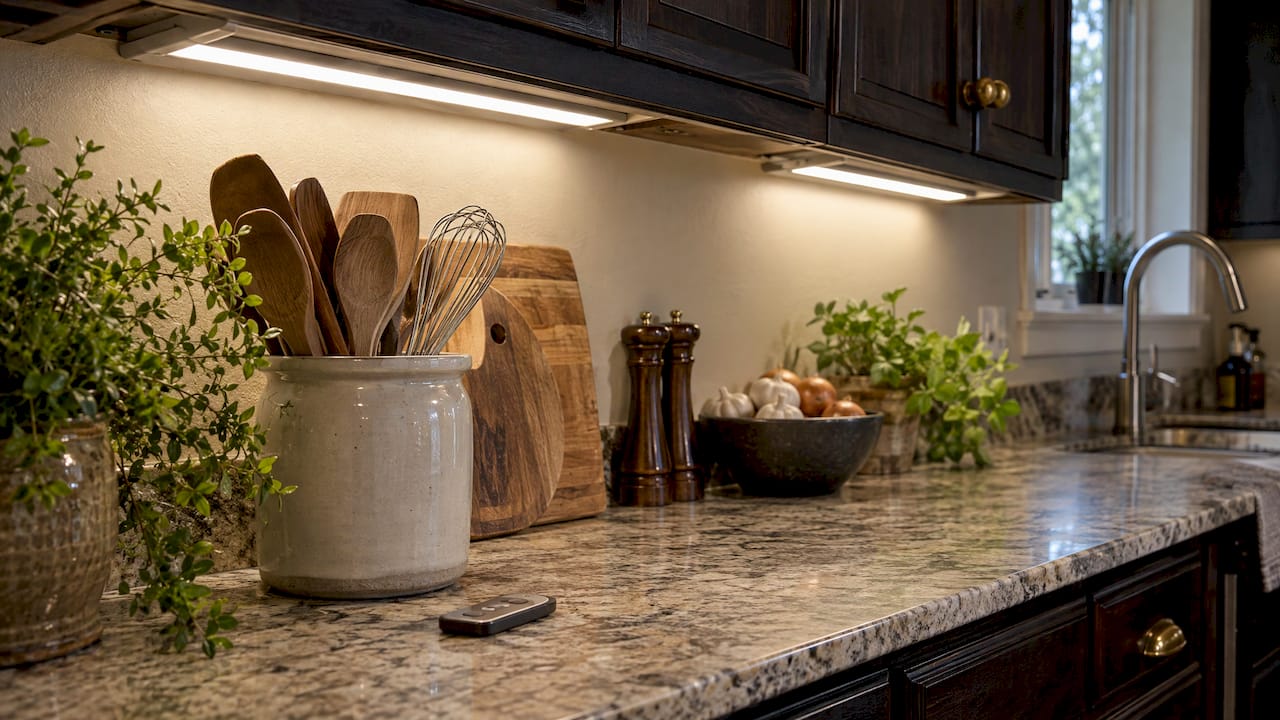
For a kitchen you plan to live in for years, the best wireless under cabinet lighting is a professionally designed system that you control from your phone, by voice and from a wall switch, with no batteries to swap. Battery pucks and plug-in bars can also be switched wirelessly, but they solve a smaller problem. Here is how each option works, what it costs, and where each fits. We install under cabinet lighting for Charlotte homeowners, and our under cabinet lighting service is built around the first option.
TL;DR
- Wireless control comes in five forms: app, handheld remote, voice assistant, motion sensor and hand-wave sensor. The best systems combine at least three.
- Battery pucks cost the least and suit closets and shelves. Smart bars and strips give you dimming, color temperature and schedules for a whole kitchen.
- Wi-Fi bars from national brands list around $40 to $70 per bar in 2026. A designed, installed system is quoted per project, so see the cost guide below before you compare.
- Choose the control path first (app, voice, switch), then the fixture. Every light should still work from a physical switch or remote if the internet drops.
- Forever Glow Lighting designs and installs smart under cabinet lighting in the Charlotte area, with phone control and multi-color options.
Table of Contents
- What wireless control actually means
- The options compared
- Option 1: custom installed smart lighting
- Option 2: smart plug-in or hardwired bars
- Option 3: rechargeable motion-sensor bars
- Option 4: battery puck lights
- How to choose the control path first
- Installation and linking: what to plan
- Our perspective
- Which option fits your kitchen
- Under cabinet lighting from Forever Glow Lighting
- FAQ
- Sources
What wireless control actually means
“Wireless” describes how you command the light, not how it gets power. Most under cabinet lights still need a power source: a plug, a hardwired connection to a switch, a low-voltage driver or batteries. The wireless part is the signal that tells them what to do. The common control types are:
- App control. Your phone talks to the lights over Bluetooth or home Wi-Fi. This is where scenes, schedules, color temperature and zones live.
- Handheld remote. A small remote sends an infrared or radio signal. It is fast and needs no phone, but infrared remotes need a clear line of sight, and radio remotes have range limits that walls and cabinet materials can shorten.
- Voice. Alexa, Google Assistant, Apple Home or Samsung SmartThings can run the lights if the fixture supports that assistant at the model level.
- Motion sensor. The light turns on when you walk up, which suits pantries and late-night trips for water.
- Hand-wave sensor. A touchless wave turns the light on when your hands are wet or covered in flour.
The practical rule: pick the controls you will actually use every day. Most households end up using a wall switch or remote for routine cooking, voice for a quick “lights on,” and the app for scenes and schedules.
The options compared
| Option | Control | Power | Typical price (listed) | Best for |
|---|---|---|---|---|
| Custom designed and installed smart lighting (Forever Glow) | Phone app, multi-color options | Professionally wired to the home | Quoted per project | Whole kitchens, long cabinet runs, a finished look |
| Smart bars (GE Cync, Feit, Enbrighten, BLACK+DECKER) | App, voice, some with Matter | Plug-in or hardwired | About $40 to $70 per bar | Kitchens with accessible outlets |
| Rechargeable motion bars | Motion sensor, remote, dimmer | USB-C battery | About $17 to $43 per set or bar | Pantries, closets, hutches |
| Battery puck lights | Tap or remote | AA or AAA batteries | About $15 to $17 | Renters, shelves, small spaces |
Prices are the ones listed by the sellers and reviewers cited below. They change, so treat them as a snapshot.
Option 1: custom installed smart lighting
A designed system starts with your cabinets rather than a box of parts. The lighting is laid out for the full run of cabinet underside, power and controls are planned together, and the finished result is controlled from your smartphone with multi-color options. Forever Glow Lighting handles design, installation and ongoing maintenance, and the GlowCare maintenance subscription keeps a system looked after once it is in.
Why this route wins for most Charlotte kitchens:
- One system, not a collection of apps. Separate bars, pucks and strips from different makers often mean separate remotes and apps. A planned installation puts the whole kitchen on a single control path.
- Continuous light. Long runs along the cabinet underside look best when the fixtures are chosen for even coverage. Our guide to COB tape and under cabinet lighting types explains how to avoid visible dots on the counter.
- Right color from day one. Warm, consistent light makes food and countertops look natural. We explain the starting point in 3000K and CRI 90+ for under cabinet lighting.
- Wiring planned with the project. Plug-in, hardwired and low-voltage layouts each suit different kitchens, and we lay them out in our under cabinet wiring options guide.
- Local work you can look at. See a finished example in our kitchen under cabinet and toe kick lighting project in Gastonia.
Cost depends on the length of the run and how the power is routed, which is why we work from per-foot math in our under cabinet lighting cost guide instead of a flat number.
Option 2: smart plug-in or hardwired bars
Bars from national brands are the next step down in scope. They are usually 12 to 24 inches long, link together, and connect to your Wi-Fi.
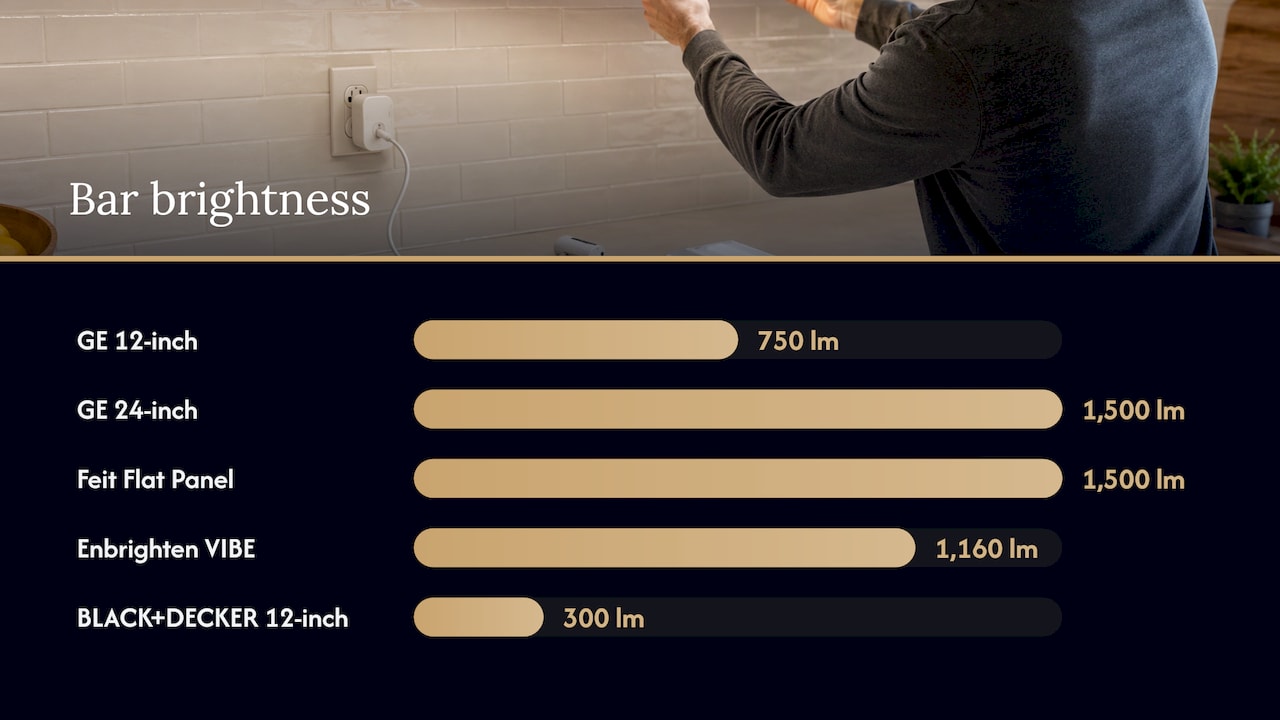
The GE Cync Reveal is a good example of the category. PCWorld’s hands-on review found the 18-inch bar priced at $64.99, the 12-inch at $59.99 and the 24-inch at $69.99. The 12-inch bar produces 750 lumens and the 24-inch 1,500 lumens, and the bars can be hardwired or run on a plug-in cord. PCWorld also notes that Wi-Fi is the best path for Alexa and Google Assistant, and that Apple Home works only through Matter over Wi-Fi, which limits the Cync app’s full features.
Other listed examples, from a September 2026 smart under cabinet roundup with prices as of November 3, 2026:
- Feit Electric Smart Under Cabinet Flat Panel: 1,500 lumens, $55.63.
- Enbrighten VIBE 24-inch Wi-Fi bar: 1,160 lumens, $39.98.
- BLACK+DECKER PureOptics Matter 6-bar kit: 300 lumens per 12-inch bar, $68.99.
These are capable products. The limit is scope: each bar is a separate light with a visible joint between fixtures, and the finished kitchen is only as tidy as the cord routing. Cabinet fronts and outlet locations decide how clean the result looks. The same GE guidance that lets you link up to 10 bars from one source also advises consulting an electrician when you are unsure about the electrical side, so a kitchen with long runs or no nearby outlet is a project for a professional from the start.
Option 3: rechargeable motion-sensor bars
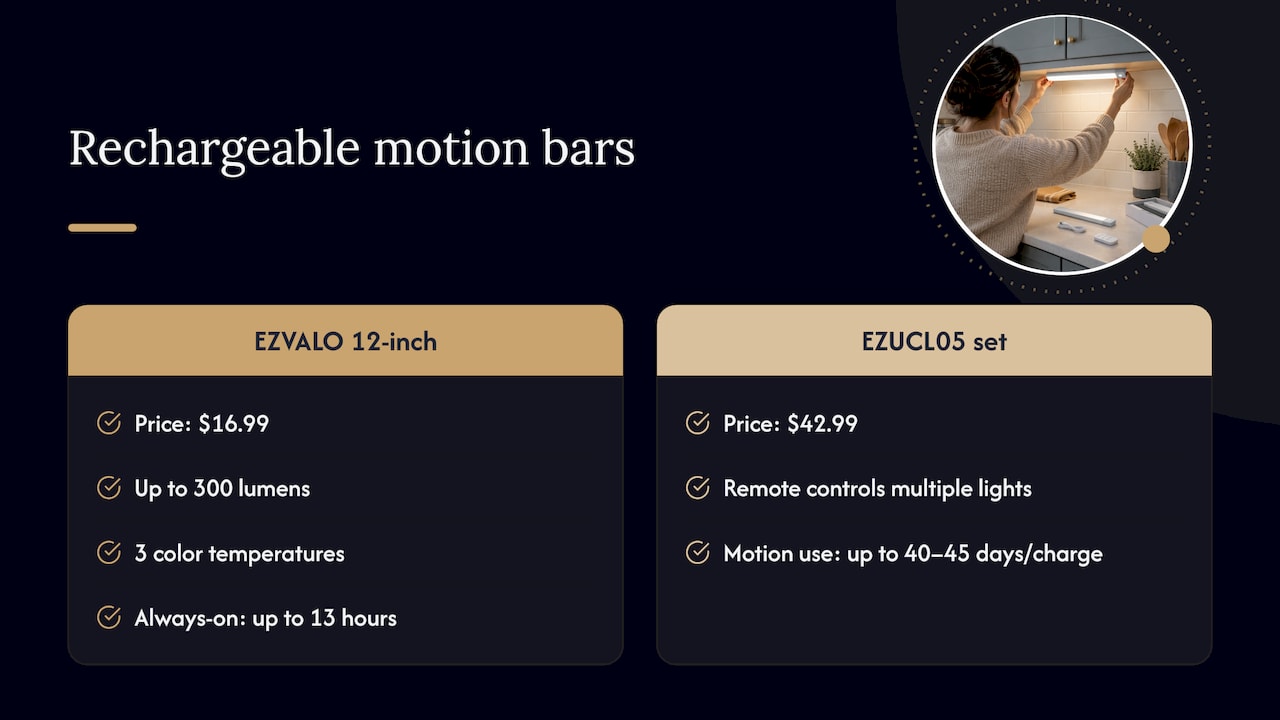
USB-C rechargeable bars stick or magnetize under the cabinet and turn on when they sense motion. The EZVALO 12-inch model, for example, is listed at $16.99 with up to 300 lumens, three color temperatures and up to 13 hours always-on or about 30 days in motion mode. EZVALO’s EZUCL05 set is listed on its own site at $42.99, with a remote that controls multiple lights and up to 40 to 45 days of motion-activated use per charge.
The control is simple: the sensor, a rotary dial or a basic remote. There is no app scheduling or whole-kitchen scene. That fits a pantry or a dark corner, and it is less suited to the main cooking counters, where you want even, dimmable light every evening and a charging routine for every bar is a chore.
Option 4: battery puck lights
Pucks are the entry point. The Brilliant Evolution wireless puck at Home Depot is listed at $14.99, with 75 lumens at 3000K, a remote that reaches 15 feet and controls up to 12 lights, and timers from 15 to 120 minutes. On three AA batteries it is listed at 72 hours of use. A six-pack from Shineled is listed at $16.99 with two remotes and four dim levels.
Better Homes & Gardens’ 2026 testing describes GE battery pucks as night-light-level output, suited to renters, closets and shelving, with no dimming or color settings. That is the honest role of a puck: a quick, tool-free accent in a small space. Kitchen counters need more light than a puck delivers, and a handful of pucks creates pools of light rather than an even wash.
How to choose the control path first
Before you pick fixtures, decide how you want to turn the lights on:
- Wall switch or remote as the baseline. Many wireless systems keep basic on, off and dimming from a physical switch or remote when the internet is down. Make this a requirement.
- Voice for convenience, never as the only control. Compatibility has to be confirmed model by model. An app that works with Alexa does not guarantee every function, such as color or scenes, is available by voice.
- App for scenes and schedules. If you want a warm evening setting, a bright prep setting and a late-night low glow, you need app control.
- Motion only where it helps. Motion suits pantries and bar areas. In a kitchen where you cook in the evening, constant triggering gets annoying.
- Match your phone ecosystem. Check Alexa, Google, Apple Home or SmartThings support before you buy, and check whether Matter is offered if you use Apple Home.
Then check the light itself. Warm white near 3000K with high color rendering makes food look right, and a dimmer range that goes low enough for night use matters more than a headline lumen number.
Installation and linking: what to plan
- Power location. Plug-in bars need an outlet within reach and a way to hide the cord. Hardwired systems need a switch or driver location planned before any drywall is touched.
- Linking limits. GE, for example, states that its bars can link up to 10 fixtures at a maximum of 220 watts from one source. Long runs can exceed any single product’s limit.
- Wi-Fi band. Many smart bars connect to 2.4 GHz Wi-Fi only, so confirm your router supports it.
- Clean surfaces. Adhesive mounts need clean, dry cabinet bottoms. A finish-safe approach to cleaning inside cabinets keeps the cabinet surfaces ready for mounting hardware without damaging the finish.
- Electrical knowledge. Hardwiring should be done by someone qualified. Where a permit or inspection applies in your area, the electrician or installer should handle it.
Our perspective
After years of designing lighting for Charlotte homes, we see the same pattern with under cabinet projects. People start by comparing bars and pucks, then realize what they really want is a kitchen that feels finished: even light along the counter, a warm color that makes food look good, and controls that anyone in the house can use without a manual.
That is why we treat wireless control as part of the design, not an add-on. We plan power, fixture type and the control path together, so your phone, voice assistant and wall switch all do something sensible. Our systems are controlled from a smartphone, offer multi-color options, and can be looked after through our GlowCare maintenance subscription after installation.
If you want the cleanest result in your kitchen, a designed and installed system is the strongest choice. It gives you one control experience across every cabinet run, and one team to call.
Dave
Which option fits your kitchen
- Full kitchen remodel or long cabinet runs: custom installed smart lighting. It is the only option designed around your cabinets, with controls planned from the start.
- Standard kitchen with accessible outlets: smart bars can work, but a designed system gives a more even, tidier result.
- Pantry, closet or hutch: rechargeable motion bars or pucks cover the need.
- Rental or temporary space: battery pucks.
If you also want exterior lighting, the same smartphone control extends to your roofline, landscape and patio, so the whole property can sit in one app.
Under cabinet lighting from Forever Glow Lighting
We design and install smart under cabinet lighting and interior accents for homes in the Charlotte area, controlled from your phone with multi-color options. Tell us about your kitchen, and we will plan the layout, power and controls together and give you a free estimate.
See Under Cabinet Lighting & Interior Accents or read how custom lighting installation works for your home.
FAQ
Can wireless under cabinet lights work without Wi-Fi?
Many can. Remote, switch and Bluetooth control often keep working for on, off and dimming when the internet is down. App scenes, schedules and voice commands usually depend on Wi-Fi, so keep a physical control as your baseline.
Do wireless under cabinet lights need wiring?
The control is wireless, but the power usually is not. Battery and rechargeable lights need none, plug-in bars need an outlet, and hardwired or low-voltage systems need an electrical connection planned during installation. Our wiring options guide shows how each layout works.
Can I control under cabinet lights with a remote and my phone?
Yes, many smart bars and strips support both. Remote range depends on the system: infrared needs line of sight, and radio remotes can lose distance through cabinet materials. Stated ranges such as 15 feet for pucks are best-case figures.
How many lights can be linked to one controller?
It depends on the product. Some pucks pair with up to 12 lights on one remote, and GE states up to 10 bars on one power source within a 220-watt limit. A designed system plans the whole run so you are not limited by a single product’s rules.
What color temperature is best for kitchen under cabinet lights?
Warm white around 3000K with a color rendering index of 90 or higher is a reliable starting point for kitchen counters. Tunable options let you change it by time of day.
Sources
- GE Cync Reveal Smart LED Undercabinet Bar Light review, PCWorld
- Best Smart Under-Cabinet Lighting (App, Voice and Matter), Sconce & Socket
- The 5 Best Under-Cabinet Lighting in 2026, Better Homes & Gardens